
Clinic Management Software Features
Manage prescriptions, patients and billing in one place.
Twelve capabilities, all included at ₹1 per patient. There is no higher plan to move up to, so nothing on this page is a preview.
- capabilities, every one included
- 12capabilities, every one included
- per patient, whatever you switch on
- ₹1per patient, whatever you switch on
- features locked behind a higher plan
- 0features locked behind a higher plan
- languages on the printed page
- 3languages on the printed page
The whole product on one screen.
- 12 capabilities
- 10 live today
- 2 you switch on
What each one actually does.
Prescriptions
LiveThe whole consultation on one screen
Complaints, diagnosis, medicines, dosage and advice in one place, so you are never hunting between tabs while the patient sits in front of you.
- Complaints, diagnosis and clinical notes
- Medicines with dosage, frequency and quantity
- Advice, lab tests and their results, and treatments
- Vitals - temperature, blood pressure, pulse, weight and SpO₂
- Attach reports, scans and photographs to the visit
- Record fees charged, amount paid and anything still outstanding
- Set the next visit date and link the follow-up to the original visit
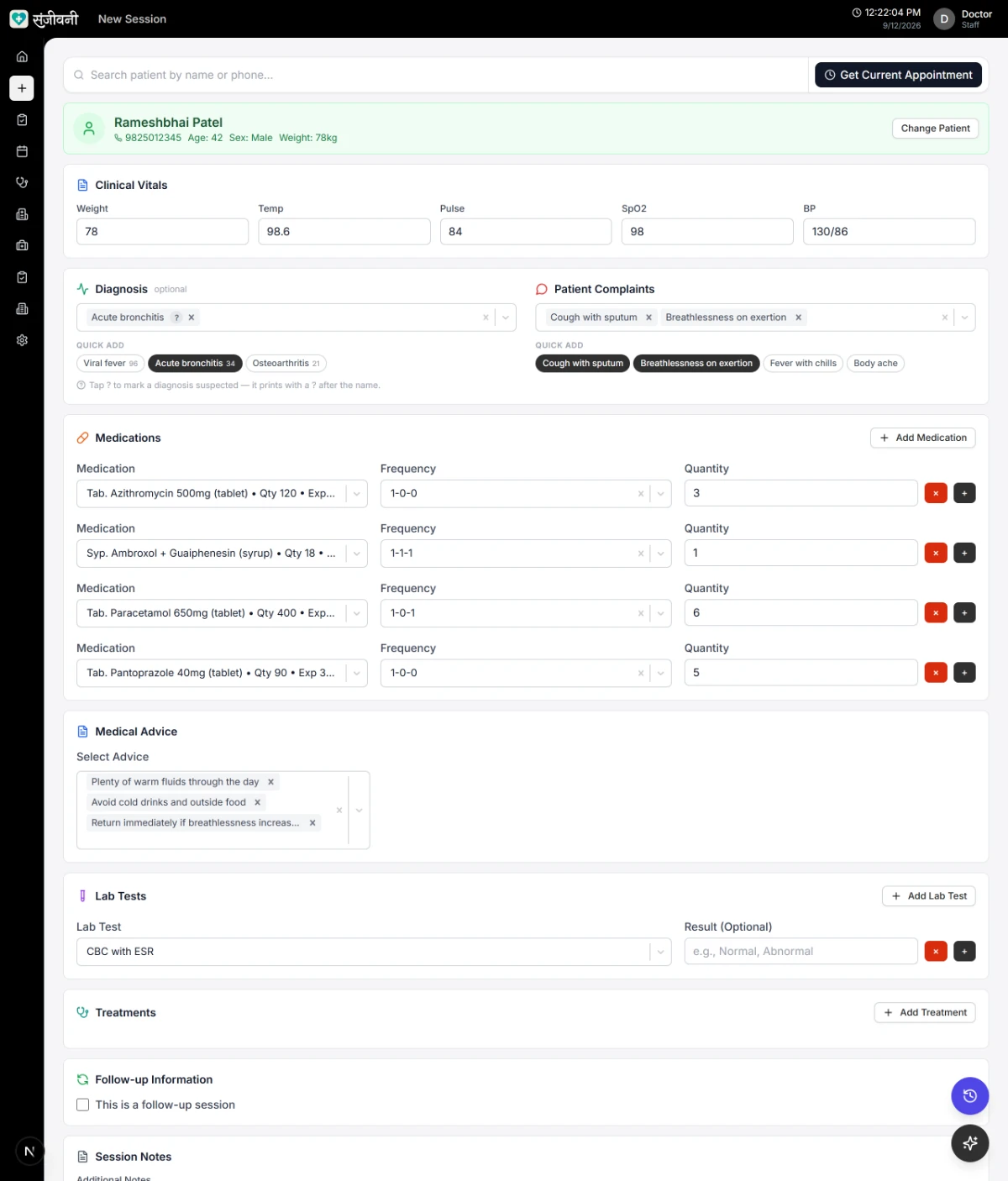
Picked from your saved list, not typed out
Printing
LiveYour letterhead, not ours
Most software makes your prescription look like their software. Upload your existing stationery, place each field on it once, and it prints there every time after that.
- Upload your existing clinic letterhead as the background
- Drag each field into position - name, age, sex, weight, date, complaints
- Control the font size, weight and colour of every field
- Print straight to your printer, or save as a PDF
- Share a link so the patient always has their copy on their phone
- Falls back to a clean built-in layout if you would rather not set one up
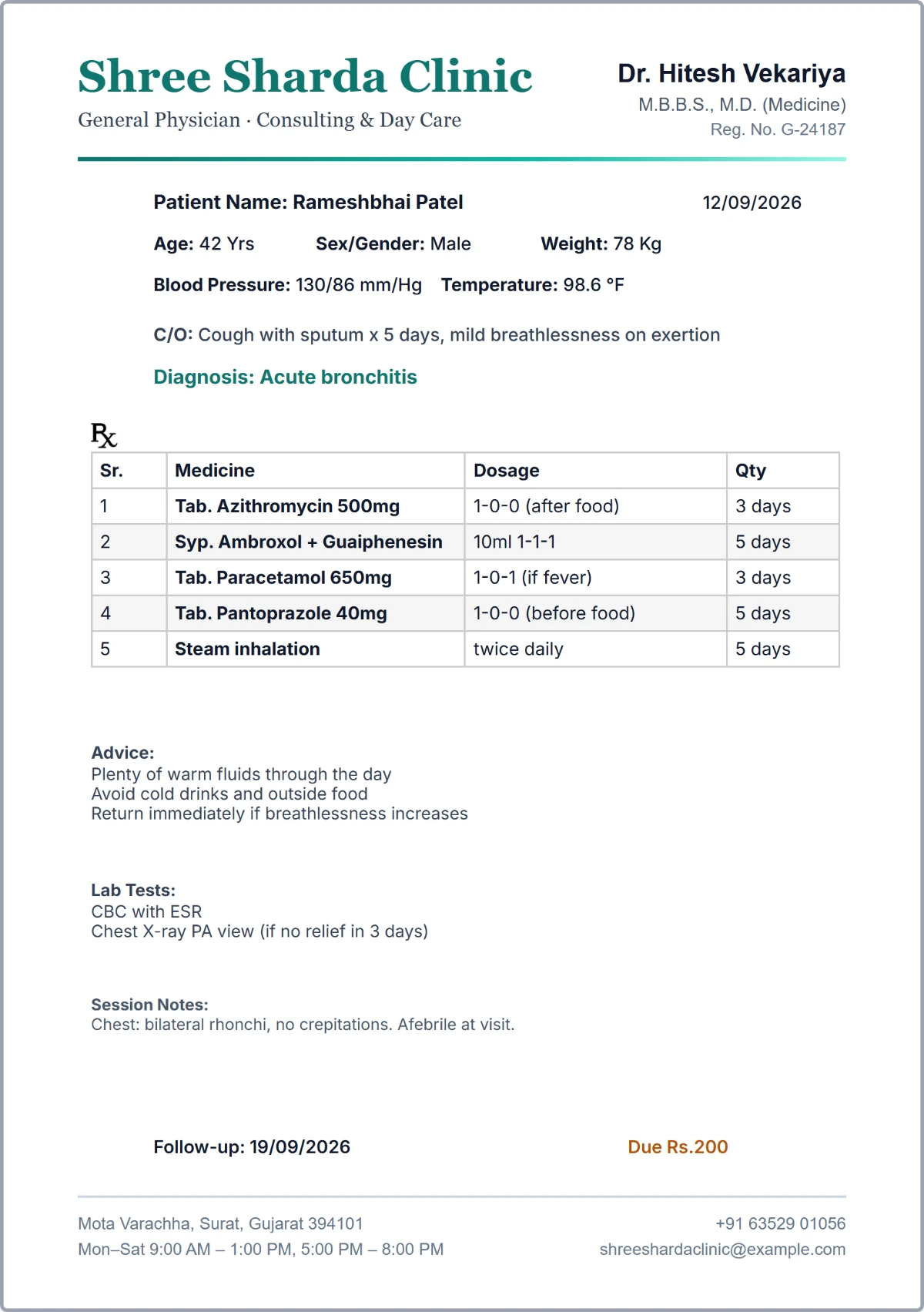
Set up once, on the day we visit
Patient history
LiveSix months later, it is still there
The value of a record shows up long after the visit, when the same patient walks back in and you need to know what you did last time.
- Every visit for a patient, in order, searchable by name or mobile number
- See exactly what was prescribed, at what dose, and whether it worked
- Follow-up visits stay linked to the visit they came from
- Reprint or re-share any past prescription
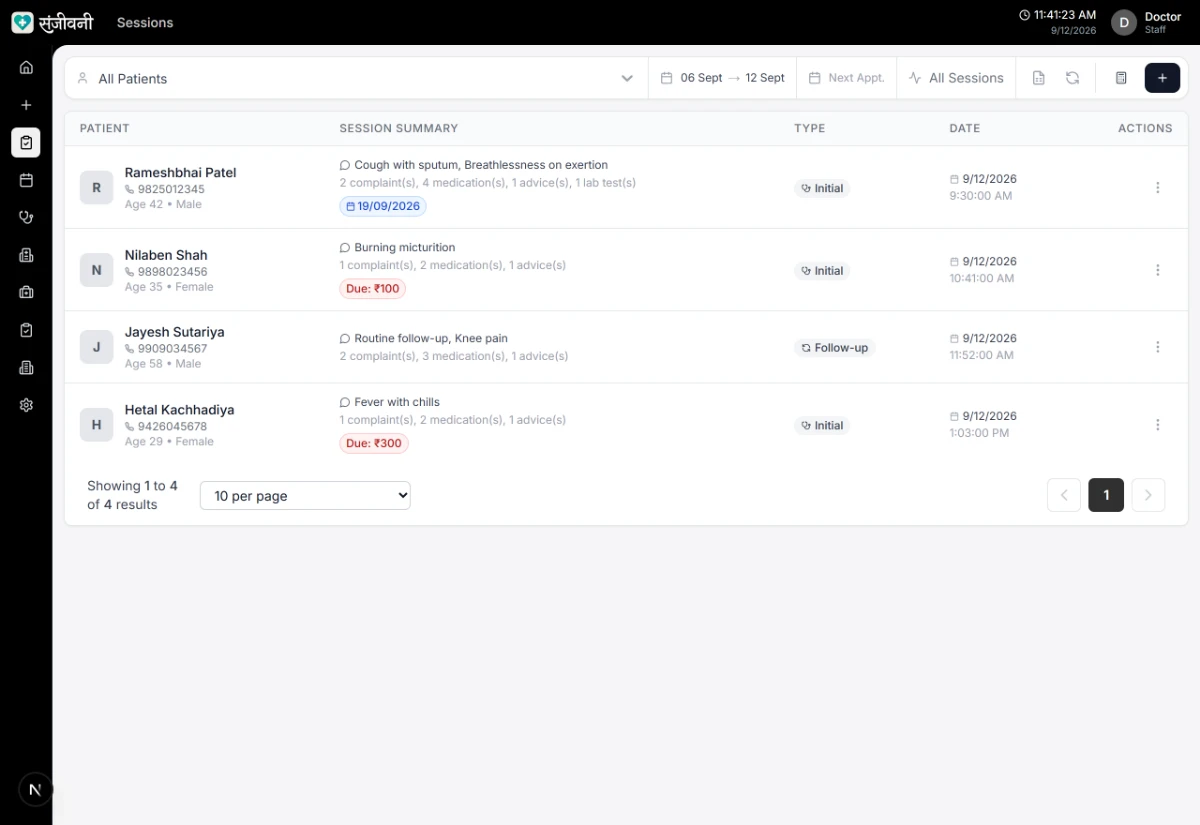
No file to find. It opens with the patient
Language
LiveIt prints in the language they read
A dosage instruction only works if the person taking the medicine can read it - including the before-food and after-food wording your clinic already uses.
- Notes and advice print in English, Hindi or Gujarati
- Add your own dosage frequencies in the wording your clinic uses
- Your saved wording is reused on every prescription after that
- The same prescription can print in a different language per patient
- English
- 1-0-1 (after food)
- हिन्दी
- 1-0-1 (खाने के बाद)
- ગુજરાતી
- 1-0-1 (જમીને)
- Printed
- Exactly as shown
Readable at home, not just at the desk
Reception
LiveWalk-ins and bookings in one queue
Most Indian clinics run on walk-ins with a few booked patients mixed in. Reception should not have to manage two lists, so they do not.
- A tablet on an anti-theft stand at reception, with a printer that issues the token
- Walk-in patients take a printed token; regular patients can book from home on the app
- Both land in the same queue, in sync with your screen - no second list to manage
- Token-style queue marking each patient pending, completed or absent
- Reception sees the queue without seeing your clinical notes
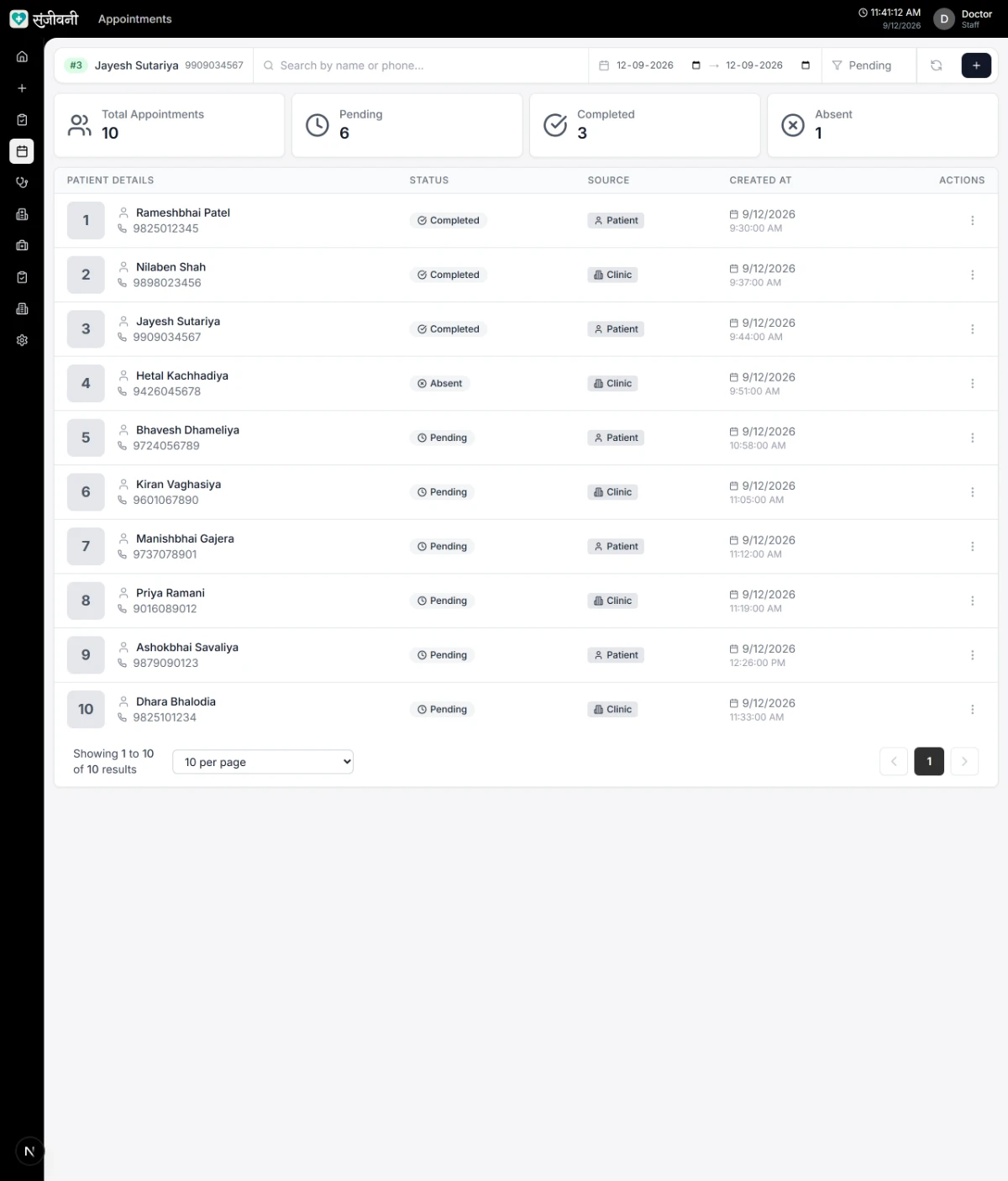
One list, however the patient arrived
The counter
LiveThe dispensing counter already knows
Your pharmacist gets their own login and sees what you have just prescribed, without anyone carrying paper across the clinic.
- Newest prescriptions first, refreshing on its own as patients arrive
- Shows medicines, dosage and quantity - not your fees or billing
- Separate login, so counter staff never touch clinical records
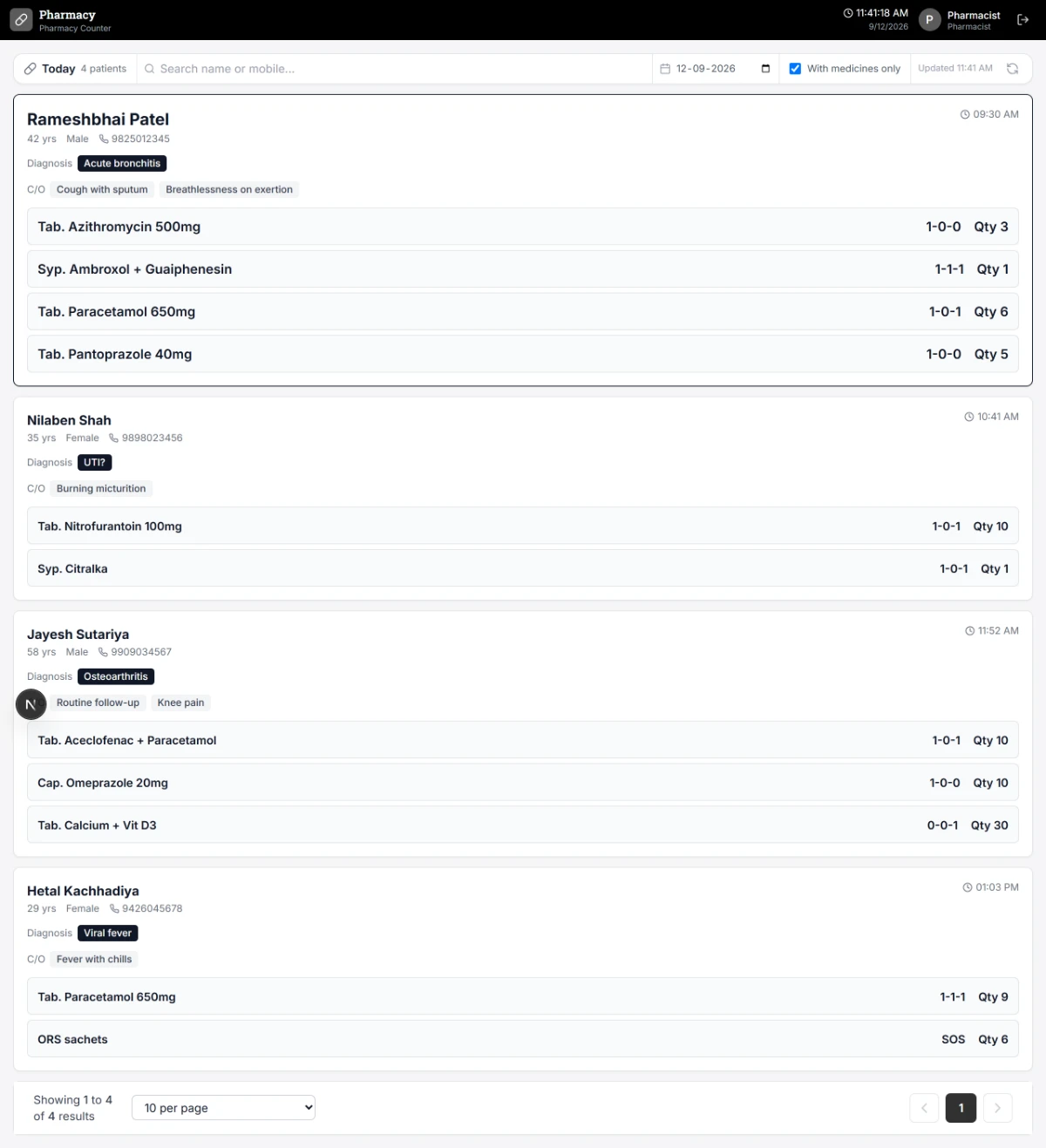
Arrives the moment you save
Money
LiveThe day totals itself
Record what was charged and what was actually collected, and let the arithmetic take care of itself at closing time.
- Part payments and outstanding dues tracked per visit
- Collection rate, average fee per session and total outstanding
- See the sessions that still have money owing against them
- Export your session data to a spreadsheet whenever you want it
- Patients seen
- 22
- Charged
- ₹9,400
- Collected
- ₹8,900
- Outstanding
- ₹500
Nobody adds anything up by hand
Optional
You approve everythingSuggestions from your own prescribing
Not a generic medical model. Enter the complaints and it offers what you have prescribed before for something similar, drawn from your clinic's record and nobody else's.
- Enter the complaints - fever, cough - and it suggests medicines, treatments and advice
- Suggestions come from your clinic's whole prescribing history, not just that one patient
- Speeds up repeat prescriptions without changing your judgement
- Entirely optional - switch it off and nothing changes
- Nothing is ever prescribed automatically; the clinical decision is always yours
- You typed
- Fever, cough, 3 days
- Suggested
- Paracetamol 650mg
- Seen in
- 48 similar visits
- Applied
- Only if you tap it
The clinical decision stays yours
Setup that pays back
LiveYour own medicine catalogue
Build the list of medicines, complaints and treatments your clinic actually uses, and every future prescription gets faster.
- Medicines with type, unit, quantity and price
- Reusable complaints, advice, lab tests and treatments
- Add your own dosage frequencies in the wording your clinic uses
- Shared across your whole clinic, not per user
- Medicines
- Your own list
- Complaints
- Reusable
- Dosages
- Your wording
- Scope
- Whole clinic
We load your common ones on day one
Sending patients on
LiveReferral letters without retyping
Keep the clinics you refer to on file, and let the letter write itself when you need it.
- Referral letter generated as a PDF, ready to print or hand over
- A record of who was referred where, and when
- Your own referral letter template
- Patient
- From this visit
- Referred to
- Your saved list
- Output
- PDF, ready to print
- Logged
- Who, where, when
Nothing typed twice
Your team
LiveEveryone sees only their own job
Doctors, receptionists and pharmacists each get their own login, and you decide exactly what each of them can see and change.
- Separate logins for doctors, receptionists and pharmacists
- Choose exactly what each role can see and change
- Clinic data is isolated - no other clinic can see your patients
- Prescriptions export as PDFs and your visit data as a spreadsheet
- Doctor
- Everything
- Reception
- Queue only
- Pharmacy
- Medicines only
- Records
- Exportable, always
Your receptionist sees what you allow
Optional
Off by defaultStock, if you dispense in-house
Clinics that hand out medicines themselves can track stock here. Clinics that do not can leave the whole thing switched off.
- Track medicine stock against what you dispense
- Tied to the same medicine catalogue your prescriptions use
- Entirely optional - nothing else depends on it
- Tracks
- What you dispense
- Source
- Your catalogue
- Required
- No
- Default
- Off
Leave it off and nothing changes
- Every feature at ₹1 per patient
- Unlimited staff logins
- Export any time
- DPDP Act, 2023
Digital Prescription Printed on Your Own Letterhead
This is the actual output, not an illustration of it - the same renderer your printer uses, shown here on a sample letterhead.
- Your own letterhead, positioned once and reused
- Vitals, complaint and diagnosis across the top
- A numbered medicine table with dosage and duration
- Advice, lab tests and the follow-up date underneath
Reception Queue, Pharmacy Counter and Patient Visit Records
Actual screens from the running software, not illustrations. The clinic and the patients shown are invented.
Time it against your own pen.
We come to your clinic, set it up on your letterhead, and you write one real prescription on it.